PKCE (Proof Key for Code Exchange)#
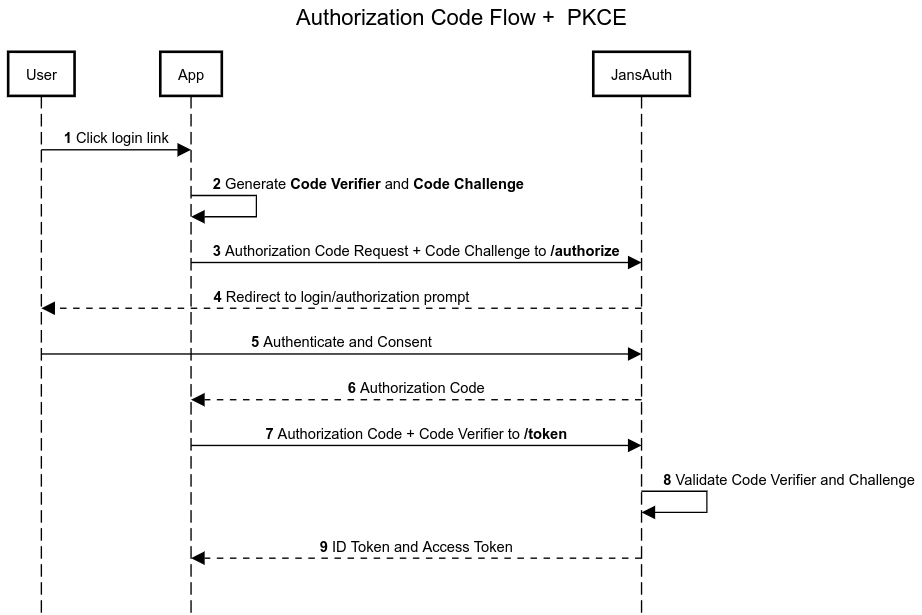
Proof Key for Code Exchange (PKCE), defined in RFC 7636, is a security extension to the OAuth Authorization Code Grant. It helps protect against authorization code interception and injection attacks by binding the authorization request to the token request.
Public clients, such as Single Page Applications (SPAs) and mobile applications, cannot securely store client secrets. PKCE protects the authorization code exchange without requiring a client secret.
Janssen requires PKCE by default for the Authorization Code Grant, including
public and confidential clients, using the S256 code challenge method.
Let's see in the following diagram how it works:
PKCE Configuration#
Janssen requires PKCE for the Authorization Code Grant by default through the
server-level requirePkce property. A client can also require PKCE through its
client attributes. Setting the server-level property to false does not disable
PKCE for clients that individually require it.
For requests processed through the authorization endpoint, only the S256
code challenge method is accepted. Requests using plain, an unsupported
method, or a code_challenge without an explicit
code_challenge_method=S256 are rejected. See the
authorization-server configuration
and the requirePkce property reference.
Authorization Code Flow + PKCE#
In this flow, we will execute the following steps:
- Generate Code Verifier and Code Challenge
- Register new client
- Call
authorizeendpoint - Call
tokenendpoint
1. Generate Code Verifier and Code Challenge#
It is necessary to generate these codes for this flow, since this data will be
sent in the authorize and token endpoints.
Code Verifier#
It is a random string of length N, and is denoted by the field code_verifier.
The following command generates a code_verifier of length 128.
tr -dc 'A-Za-z0-9-._' </dev/urandom | head -c 128; echo
Output example:
root@jans:~# tr -dc 'A-Za-z0-9-._' </dev/urandom | head -c 128; echo
MW54l5Ma7i8n6QsetI_dnJhfMQ6gIfBNJiWFINu6rtD0zvZUXG3STWoolT5HFatjWu2Vj1L-Au4PtRzkear088FJLzq.6tAg10wikJrIqn75HCJ7V1b_p8io_ugkPkkr
Code Challenge#
To generate the code_challenge we need to know what type of method we will be using, so this field is accompanied by
the code_challenge_method field.
Janssen Server requires code_challenge_method=S256. The code_challenge is
the base64url-encoded SHA-256 digest of the code_verifier.
The following command generates the code_challenge using S256.
Note
To execute the command below, you need to have openssl, basenc
and tr installed.
echo -n "MW54l5Ma7i8n6QsetI_dnJhfMQ6gIfBNJiWFINu6rtD0zvZUXG3STWoolT5HFatjWu2Vj1L-Au4PtRzkear088FJLzq.6tAg10wikJrIqn75HCJ7V1b_p8io_ugkPkkr" | openssl dgst -binary -sha256 | basenc --base64url | tr -d '='
Output example:
root@jans:~# echo -n "MW54l5Ma7i8n6QsetI_dnJhfMQ6gIfBNJiWFINu6rtD0zvZUXG3STWoolT5HFatjWu2Vj1L-Au4PtRzkear088FJLzq.6tAg10wikJrIqn75HCJ7V1b_p8io_ugkPkkr" | openssl dgst -binary -sha256 | basenc --base64url | tr -d '='
zyI60XbvMetJJuAzyRR_jnxoJkyfxXSqY-mTG4FtBtg
2. Register new client#
POST <YOUR_DOMAIN>/jans-auth/restv1/register HTTP/1.1
Content-Type: application/json

{
  "client_name": "PKCE Test Client",
  "application_type": "web",
  "token_endpoint_auth_method": "none",
  "scope": [
    "openid",
    "profile",
    "email"
  ],
  "grant_types": [
    "authorization_code"
  ],
  "response_types": [
    "code"
  ],
  "redirect_uris": [
    "https://<YOUR_DOMAIN>/jans-auth-rp/home.htm"
  ]
}
Note
Note that the token_endpoint_auth_method field is none.
HTTP/1.1 201 Created
Date: Fri, 17 Nov 2023 22:51:13 GMT
Server: Apache/2.4.41 (Ubuntu)
X-Xss-Protection: 1; mode=block
X-Content-Type-Options: nosniff
Strict-Transport-Security: max-age=31536000; includeSubDomains
Expires: Thu, 01 Jan 1970 00:00:00 GMT
Cache-Control: no-store
Content-Type: application/json
Pragma: no-cache
Content-Length: 1541
Set-Cookie: X-Correlation-Id=d92eddf5-ab08-4b4f-a8f1-10af67e83dbd; Secure; HttpOnly;HttpOnly
Connection: close

{
  "allow_spontaneous_scopes": false,
  "application_type": "web",
  "rpt_as_jwt": false,
  "registration_client_uri": "https://<YOUR_DOMAIN>/jans-auth/restv1/register?client_id=f48fbdfa-4c07-49e5-938b-10463980e145",
  "tls_client_auth_subject_dn": "",
  "run_introspection_script_before_jwt_creation": false,
  "registration_access_token": "659ccbf9-ac98-437a-b952-33bfc0366fc2",
  "client_id": "f48fbdfa-4c07-49e5-938b-10463980e145",
  "token_endpoint_auth_method": "none",
  "scope": "email openid profile",
  "client_secret": "a656a654-c930-4b52-9edb-68ead50d046e",
  "client_id_issued_at": 1700261473,
  "backchannel_logout_uri": "",
  "backchannel_logout_session_required": false,
  "client_name": "PKCE Test Client",
  "par_lifetime": 600,
  "spontaneous_scopes": [],
  "id_token_signed_response_alg": "RS256",
  "access_token_as_jwt": false,
  "grant_types": [
    "authorization_code"
  ],
  "subject_type": "pairwise",
  "additional_token_endpoint_auth_methods": [],
  "keep_client_authorization_after_expiration": false,
  "require_par": false,
  "redirect_uris": [
    "https://<YOUR_DOMAIN>/jans-auth-rp/home.htm"
  ],
  "redirect_uris_regex": "",
  "additional_audience": [],
  "frontchannel_logout_session_required": false,
  "client_secret_expires_at": 1700347873,
  "access_token_signing_alg": "RS256",
  "response_types": [
    "code"
  ]
}
3. Call authorize endpoint#
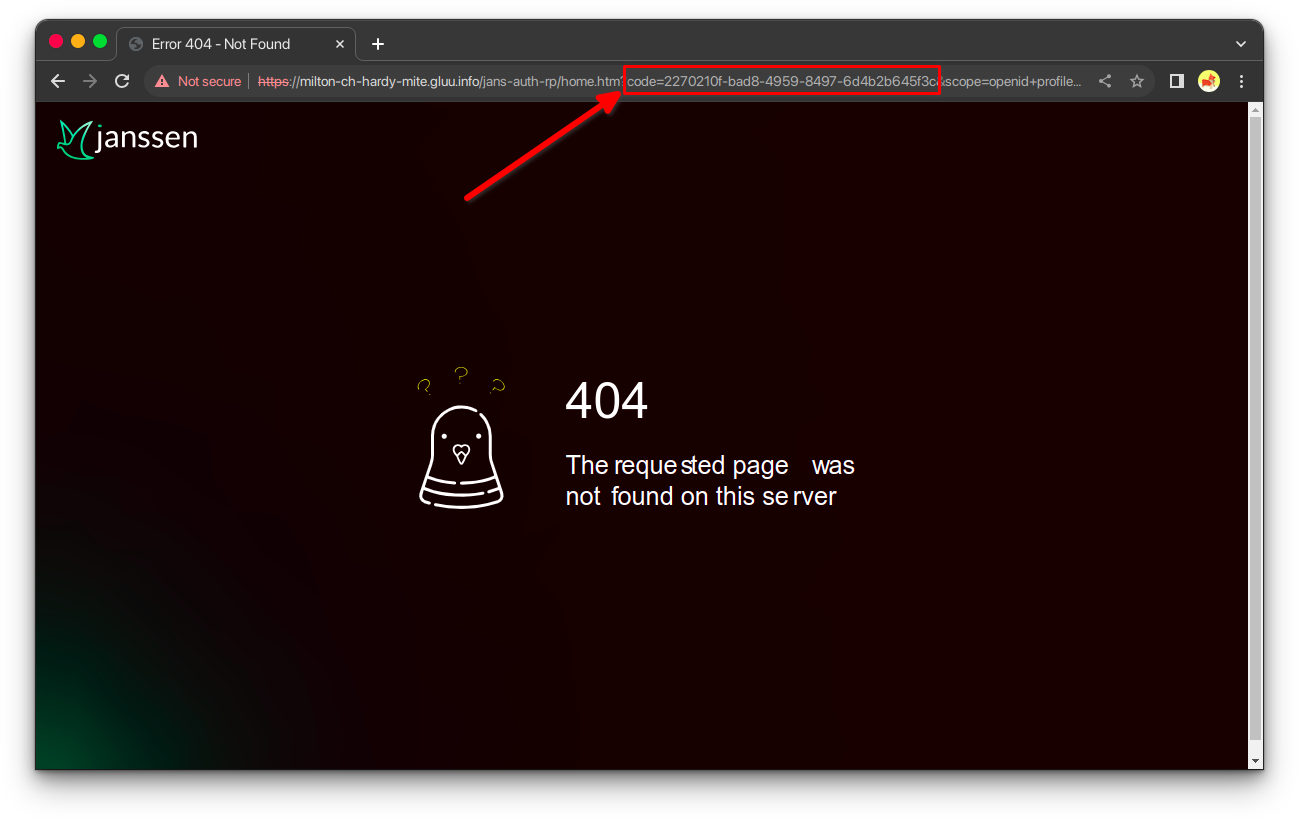
From your browser of choice call the following url:
https://<YOUR_DOMAIN>/jans-auth/restv1/authorize?
response_type=code&
client_id=f48fbdfa-4c07-49e5-938b-10463980e145&
scope=openid+profile+email&
redirect_uri=https://<YOUR_DOMAIN>/jans-auth-rp/home.htm&
state=bf1af4a1-8713-49c6-b229-537bf4cf712d&
nonce=f2265e46-6d93-4d36-850b-8fd990cccd04&
code_challenge=<YOUR_CODE_CHALLENGE>&
code_challenge_method=S256
Note
Remember that this endpoint is where you must send the code_challenge and code_challenge_method
parameters.
The field we need to obtain is the code.
4. Call token endpoint#
Previously we have obtained the code field, we will use this value to call the endpoint token.
POST <YOUR_DOMAIN>/jans-auth/restv1/token HTTP/1.1
Content-Type: application/x-www-form-urlencoded

grant_type=authorization_code&
redirect_uri=https://<YOUR_DOMAIN>/jans-auth-rp/home.htm&
client_id=f48fbdfa-4c07-49e5-938b-10463980e145&
code_verifier=<YOUR_CODE_VERIFIER>&
code=<YOUR_CODE>
{
  "access_token": "<ACCESS_TOKEN>",
  "id_token": "<ID_TOKEN>",
  "token_type": "Bearer",
  "expires_in": 299
}